The detective board guide explains the board structure used by these tools. Read the case board workflow to identify which features your investigation needs.
Quick Answer: The right detective board software depends on whether your project requires local data privacy or real-time team collaboration. For private case files, sensitive evidence, and relationship mapping where data must stay off third-party servers, Redstrings runs locally on Windows 11 and macOS with seven built-in entity types and labeled strings. For browser-based team collaboration or sharing boards publicly with communities, DetectiveBoard.io and Milanote offer flexible cloud canvases.
This guide compares detective board software for private investigators, consultants, analysts, and researchers, from purpose-built case tools to general visual mapping apps.
How We Evaluated These Tools
Reviewed in September 2026. We evaluated each tool against practical criteria required for investigation and relationship mapping:
- Entity categorization: Can you distinguish between people, places, events, and evidence, or does the tool treat everything as a generic note?
- Labeled connections: Can you define the relationship and direction on each connecting line?
- Data privacy and storage: Does your case data stay on your local computer, or does it live on third-party cloud servers?
- Search and scale: Can you quickly find specific cards, notes, or sources as an investigation grows?
- Pricing model: Is the software available as a one-time purchase, or does it require an ongoing subscription?
Best Detective Board Software Compared
1. Redstrings
Best for: Independent investigators, researchers, and analysts who need local-first privacy and purpose-built case features
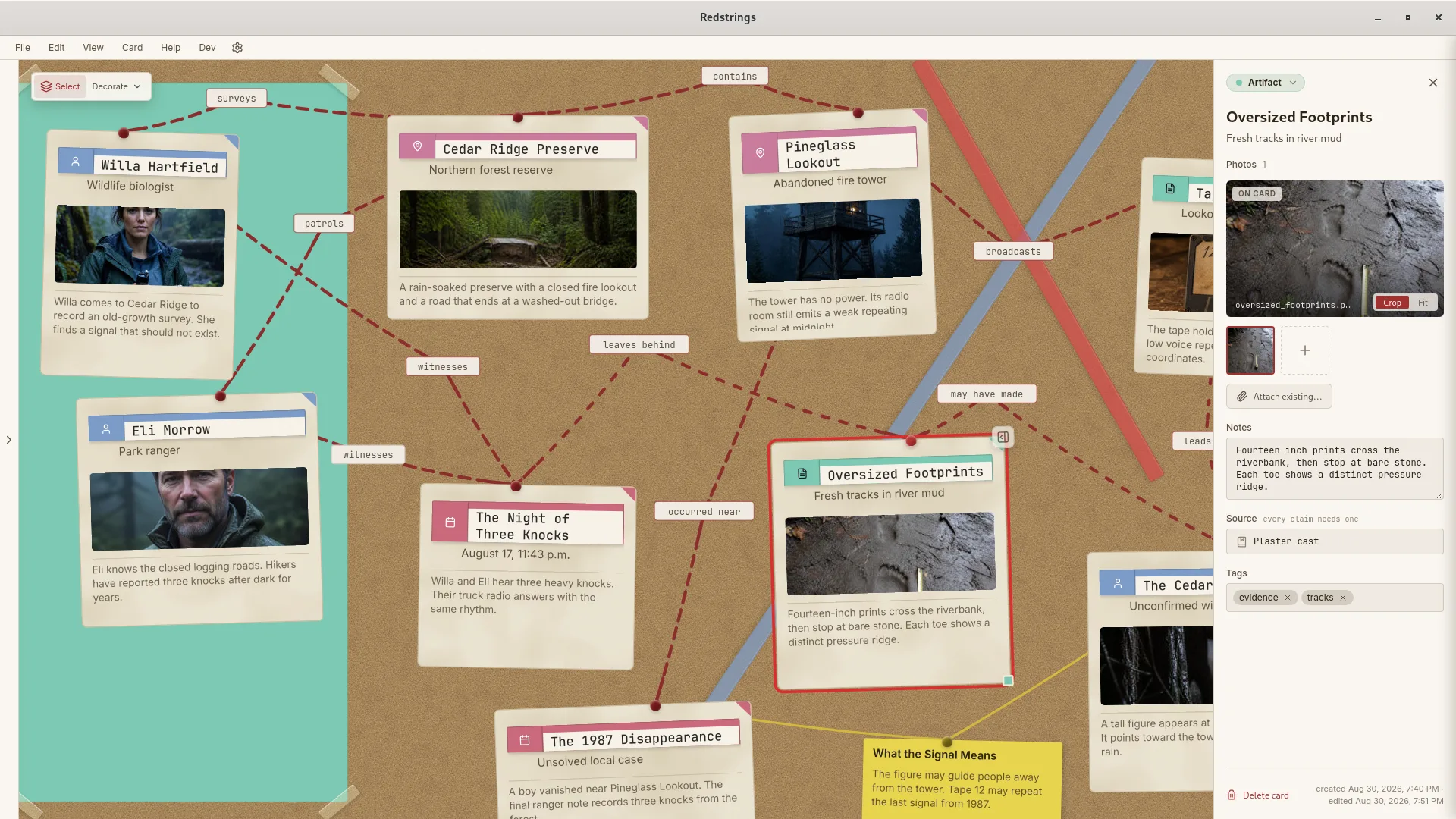
Redstrings is a desktop application built specifically for visual investigations and relationship mapping. Rather than treating an evidence board as an unstructured drawing canvas, it organizes information using seven dedicated card types, directional strings, and relationship labels.
Key Features:
- 7 built-in card types (Person, Team, Artifact, Process, Place, Event, Note)
- Labeled connections with relationship types
- Local-first: boards are files on your machine. No accounts, no sync.
- Desktop app for Windows 11 and macOS
- Multiple boards per project
- Export project files, PNG images, and Markdown reports
- AI analysis (Pro) with your own Gemini API key
Pricing: Free tier (unlimited boards, cards, and strings) / $19.99 one-time for Pro through the app store
Pros:
- Built specifically for case mapping and entity relationships
- 100% local file storage ensures sensitive case files remain on your machine
- One-time purchase with no recurring monthly subscription
- Fast, native desktop performance built with Swift and Rust
Cons:
- No real-time multi-user cloud collaboration (share by exporting files, or publish a public link with Share Project in Pro)
- No Linux or mobile versions
- Requires Windows 11 on PC (Windows 10 is not supported)
2. DetectiveBoard.io
Best for: Browser-based puzzle games, ARG communities, and casual collaborative mystery boards
DetectiveBoard.io is an online investigation board application styled after a classic corkboard. It lets users pin evidence cards, attach photos, and connect them with red strings directly inside a web browser.
Key Features:
- Interactive web-based corkboard canvas
- Card creation with text, images, and pins
- Red string connectors between elements
- Shareable public web links for boards
Pricing: Free tier with limited board counts; monthly subscription for unlimited boards and expanded storage.
Pros:
- Runs in any modern web browser with no software installation required
- Shareable public links make it easy to post boards to forums and communities
- Classic corkboard aesthetic out of the box
Cons:
- Cloud-only storage: sensitive case notes and private investigation data reside on external servers
- Requires an active internet connection to access boards
- Lacks structured entity typing, source citation tracking, and confidence ratings
- Monthly subscription model
3. Milanote
Best for: Visual thinkers who want cloud collaboration
Milanote is a visual workspace for organizing ideas. While not specifically designed for investigations, its flexible board system can be adapted for detective board use.
Key Features:
- Flexible card-based boards
- Image and file attachments
- Real-time collaboration
- Web-based access
Pricing: Free (100 cards) / $9.99/month billed annually ($12.50 monthly)
Pros:
- Clean interface
- Good for visual mood boards
- Collaboration features
Cons:
- Not investigation-focused
- Cloud-based (privacy concerns for sensitive data)
- Monthly subscription
- No confidence levels or source fields
4. Miro
Best for: Large teams needing an infinite collaborative whiteboard
Miro is an enterprise whiteboard platform designed for brainstorming, agile planning, and workshops. It handles dozens of simultaneous contributors on an infinite canvas.
Key Features:
- Infinite canvas with pan and zoom navigation
- Real-time multi-user editing, comments, and voting
- Extensive diagramming shape libraries and templates
- Integrations with Jira, Google Workspace, and Slack
Pricing: Free tier (3 editable boards) / Starter plan from $8 per member per month billed annually.
Pros:
- Industry-standard real-time team collaboration
- Expansive canvas capable of holding massive diagrams
- Broad ecosystem of enterprise integrations
Cons:
- Built for business brainstorming rather than investigative case mapping
- No local file storage option: all data resides in the Miro cloud
- Per-user monthly subscription becomes expensive for independent practitioners
5. Scapple
Best for: Writers wanting a simple, local note-mapping scratchpad
Scapple, developed by Literature and Latte (the creators of Scrivener), is a minimalist freeform canvas. You double-click anywhere to type a note and drag notes onto each other to draw connecting lines.
Key Features:
- Minimalist, distraction-free note canvas
- Quick drag-and-drop connections
- Local file storage on your computer
- One-time license purchase
Pricing: Approximately $21 one-time purchase from Literature and Latte.
Pros:
- Lightweight and quick to start
- Files are stored locally on your hard drive
- Affordable one-time fee with no recurring subscription
Cons:
- No card categorization or entity metadata
- Connection labels are supported on macOS only, not in the Windows version
- Basic feature set with no search filters or export reporting
6. Creately
Best for: Diagramming workflows with pre-built flowchart and board templates
Creately is a diagramming and visual collaboration platform that includes evidence board and link analysis templates. It functions similarly to traditional diagramming software with added real-time collaboration.
Key Features:
- Evidence board and link analysis templates
- Extensive library of flow chart and diagram shapes
- Real-time collaborative editing
Pricing: Free tier (limited shapes and boards) / paid plans starting from $8 per user per month.
Pros:
- Ready-made templates for investigation and flowchart structures
- Good general diagramming capabilities
Cons:
- Cloud-dependent: boards sync to Creately cloud servers
- Generic diagramming tool that lacks investigation-first data models
- Per-user recurring subscription
Comparison Table
| Feature | Redstrings | DetectiveBoard.io | Milanote | Miro | Scapple | Creately |
|---|---|---|---|---|---|---|
| Primary focus | Investigation & relationship mapping | Web corkboards & puzzle sharing | Visual workspace & mood boards | Team whiteboard & brainstorming | Loose note mapping | General diagramming |
| Storage model | 100% local files | Cloud-hosted | Cloud-hosted | Cloud-hosted | Local files | Cloud-synced |
| Card categorization | 7 built-in types + custom (Pro) | Generic cards | Generic notes | Sticky notes & shapes | Plain text notes | Diagramming shapes |
| Labeled connections | Yes (directional & typed) | Basic lines | Yes | Yes | macOS only | Yes |
| Collaboration | File export, reports, public links (Pro) | Public link sharing | Real-time multi-user | Real-time multi-user | None | Real-time multi-user |
| Pricing | Free / $19.99 one-time | Free / Subscription | Free / $9.99/mo | Free / $8+/user/mo | ~$21 one-time | Free / $8+/user/mo |
Which Detective Board Software Should You Choose?
Choose Redstrings if:
- You work with confidential case files, client data, or research that requires strict local-first privacy
- You need dedicated card types, relationship labels, confidence levels, and source attribution
- You prefer a one-time purchase over recurring monthly subscriptions
- You work independently and do not need real-time multi-user editing
Choose DetectiveBoard.io if:
- You want an instant web-based corkboard without installing software
- You are creating public puzzle boards, ARG clues, or mystery games to share with an online community
- Your board does not contain confidential client or legal data
Choose Milanote or Miro if:
- You collaborate in real time with an active distributed team
- Cloud access across browsers and mobile devices is essential for your group
- Your projects focus more on creative brainstorming than structured evidentiary analysis
Choose Scapple if:
- You need an ultra-simple, unstructured scratchpad for loose notes alongside Scrivener
- You do not need search filters, card types, or investigation-specific fields
Conclusion
Entity types, labeled connections, and confidence ratings are the features that matter when you are piecing together an investigation. While general whiteboards and diagramming tools can mimic the appearance of a corkboard, purpose-built investigation software turns loose notes into a structured case.
Redstrings is a detective board app that combines dedicated investigation features with local file storage. It is free to download on Windows 11 and macOS, with no account or sign-up required.
Download Redstrings to begin mapping your case.