The detective board overview explains the basic board structure. For the material attached to each lead, see how to organize an evidence board.
A case board is a visual workspace for organizing all the information related to an investigation or complex case. Whether you're working a criminal investigation, corporate fraud case, or research project, a case board helps you see how people, events, documents, and evidence connect.
This guide covers how to set up a case board and which tools to consider.
What is a Case Board?
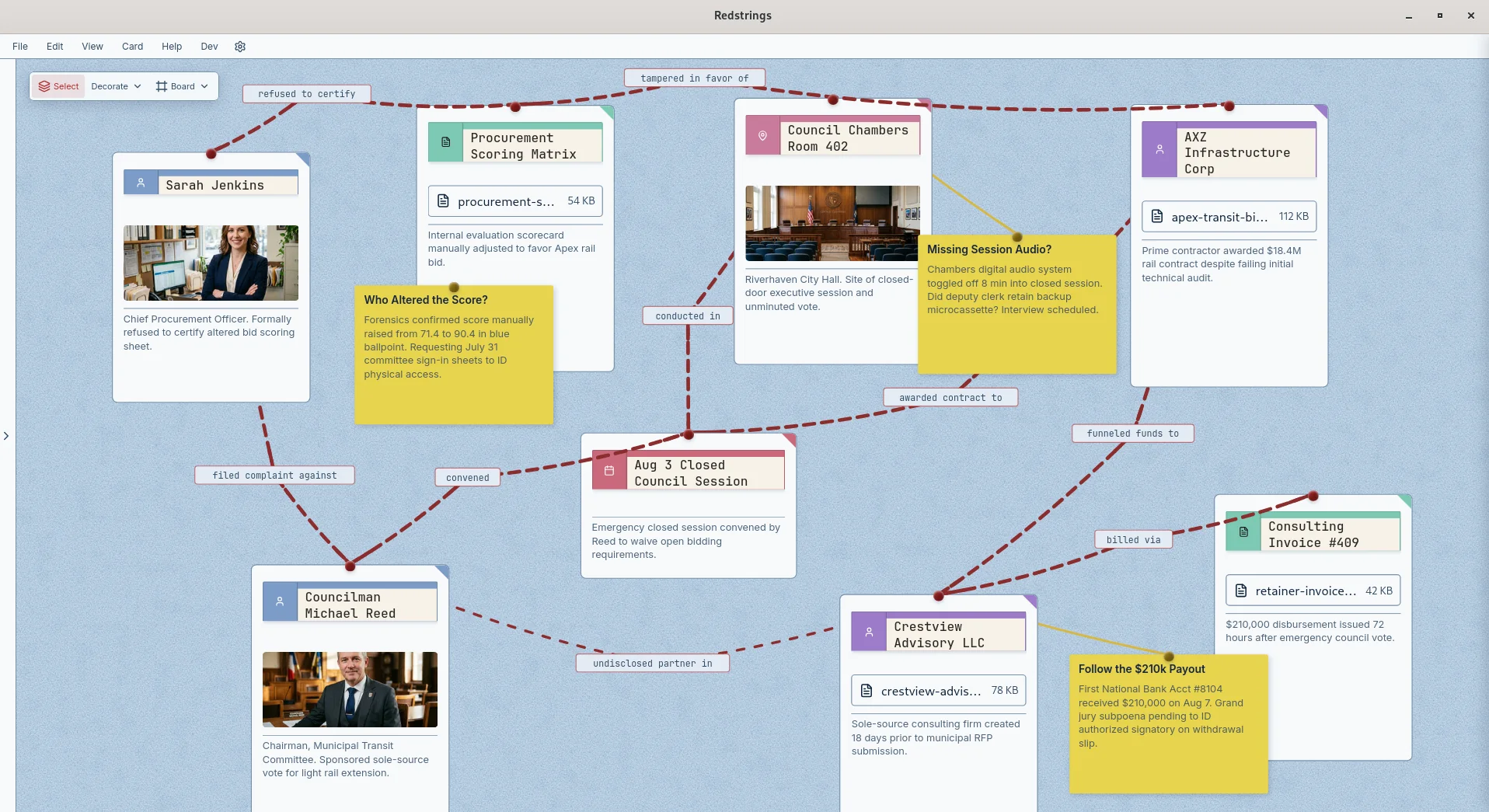
A case board (also called a crime board, investigation board, or detective board) displays case information visually. You place facts on a canvas where you can see how they relate, rather than leaving them spread across documents and spreadsheets.
A typical case board includes:
- Subjects - People involved in the case
- Organizations - Companies, groups, agencies
- Events - Incidents, meetings, transactions
- Evidence - Documents, records, physical items
- Locations - Addresses, venues, geographic areas
- Connections - Relationships between all of the above
Why Use Case Board Software?
Complex cases involve too much information to hold in your head. Case board software provides:
- External memory. Offload facts to the board so you can focus on analysis.
- Visual patterns. See connections that would be invisible in documents.
- Organization. Keep all case materials in one structured place.
- Search. Find a card by name, notes, tags, or source.
- Sharing. Export a report or a board image when someone else needs to see the picture.
- Documentation. Create a visual record of your investigation.
Case Board vs. Case Management Software
Case board software is different from traditional case management systems:
| Case Management | Case Board |
|---|---|
| Administrative workflow | Analytical workspace |
| Forms and databases | Visual canvas |
| Track tasks and deadlines | Map relationships and patterns |
| Structured data entry | Flexible exploration |
| Compliance-focused | Analysis-focused |
Many investigators use both: case management for administrative tracking and case boards for analytical work.
Types of Cases That Benefit from Case Boards
Criminal Investigations
Map suspects, witnesses, victims, locations, and evidence. Put events in order. Identify connections between seemingly unrelated people or incidents.
Fraud Investigations
Track complex transaction flows, shell company structures, and relationships between individuals and entities. Visualize how money moved and who controlled it.
Corporate Investigations
Internal investigations, HR matters, compliance issues. Map employee relationships, document chains, and communication patterns.
Due Diligence
Research companies, principals, and their connections before acquisitions, partnerships, or major transactions.
Insurance Claims
Investigate complex or suspicious claims. Map claimants, witnesses, medical providers, and prior claim history.
Legal Cases
Organize complex litigation with multiple parties, witnesses, documents, and events. Prepare for depositions and trial by visualizing the case story.
How to Set Up a Case Board
Step 1: Define the Case Scope
What are you investigating? What questions are you trying to answer? A clear scope keeps the board from sprawling.
Step 2: Create Your Central Focus
Every case has a center of gravity. It might be:
- A primary subject (person of interest)
- An incident (the crime or event)
- An entity (company being investigated)
- A question (what happened to the money?)
Place this central focus prominently on your board.
Step 3: Add Known Entities
Populate the board with what you already know:
- People mentioned in case materials
- Organizations involved
- Key dates and events
- Important documents or evidence
- Relevant locations
Step 4: Draw Connections
Connect entities that are related. Label each connection:
- "Person A" works for "Company X"
- "Document 1" mentions "Person B"
- "Event 3" occurred at "Location Y"
- "Person A" called "Person C" (3/15, 14 min)
Step 5: Add Context and Notes
For each entity and connection, add relevant context:
- Source of information
- Date obtained or observed
- Confidence level (Confirmed, Suspected, or Uncertain)
- Notes and observations
- Questions to investigate
Step 6: Organize Spatially
Use the canvas space meaningfully:
- Put related entities next to each other
- Place central figures prominently
- Create zones for different aspects of the case
- Use visual proximity to show relationship strength
Case Board Best Practices
One Board Per Case (Usually)
Keep separate cases on separate boards. For complex cases, you might create multiple boards for different aspects (one board for the sequence of events, one for relationships, one for evidence).
Consistent Categorization
Use the same entity types consistently. If you mark people as Subject, Witness, or Victim (tags work for this), apply the marks the same way every time.
Date Everything
When did events happen? When were documents created? When did relationships exist? Without dates you cannot tell what happened first.
Source Everything
Every fact should trace to a source. This maintains credibility and helps you return to primary materials when needed.
Review Regularly
Step back and look at the whole board periodically. What patterns do you see? What's missing? What questions remain?
Keep It Updated
Update the board as new information arrives. Remove or mark items that turn out to be irrelevant.
Case Board Software Options
Purpose-Built Tools
- Redstrings - Visual investigation boards, local-first privacy, free tier
- i2 Analyst's Notebook - Enterprise standard, expensive
- CaseMap - Litigation fact and document database with timeline output, not a visual board
General Tools Adapted for Cases
- Miro/Mural - Whiteboards, flexible but not case-focused
- Notion - Databases and docs, limited visual mapping
- Excel - Familiar but poor for relationships
What to Look For
- Visual relationship mapping
- Entity categorization (people, orgs, events)
- Labeled connections
- Search and filter
- Privacy (local storage for sensitive cases)
- Export capabilities for reports
Why Redstrings for Case Boards?
Redstrings is a red string board built for this kind of work:
- 7 card types - Person, Team, Artifact, Process, Place, Event, Note
- Labeled connections - Document relationship types precisely
- Confidence levels - Mark connections as Confirmed, Suspected, or Uncertain
- Source tracking - Record where each fact came from
- Multiple boards - Organize complex cases into separate views
- Local files - Boards live on your machine. No accounts, no sync. Optional AI analysis (Pro) uses your own Gemini key.
- Free tier - Unlimited boards, cards, and strings. No account required.
Redstrings installs from the Microsoft Store or the Mac App Store. No account, no setup.
Download Redstrings free and organize your next case visually.